Every report starts as a form

Your Reports Can Only Answer What Your Forms Collected.

FAMCare builds structure into every form and field, so your data is ready to count, connect and defend.

When funders, boards and auditors ask a question, your report has to answer it. But a report can only count what was captured, the way it was captured.

FAMCare starts earlier, at the form. Every answer is saved as a structured field, every form connects to one client record, and every report is built from that same record. That’s what makes funder-ready reports possible: you build each one once on solid data, then rerun it every period.

One client's journey · One connected record

1 · Intake
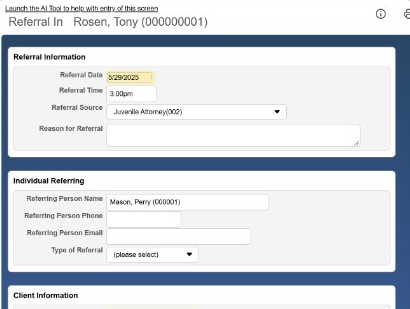
FAMCare intake screen: referral information form with structured fields (test data)
Standard questions, structured answers.

2 · Assessment

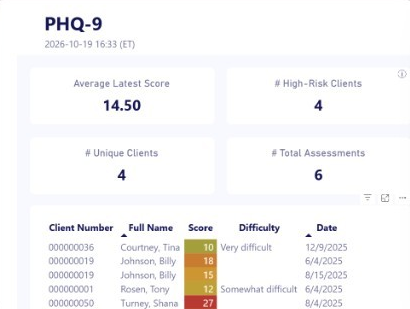
FAMCare PHQ-9 assessment summary with scores saved as numbers (test data)
Scores saved as numbers, not notes.

3 · Services

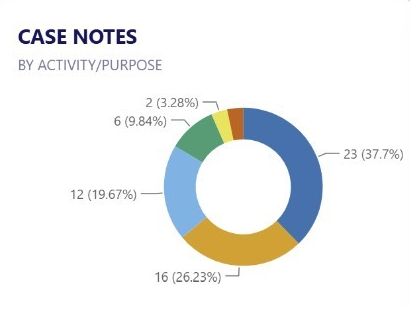
FAMCare case notes chart by activity and purpose (test data)
Every contact tied to the client.

4 · Outcomes

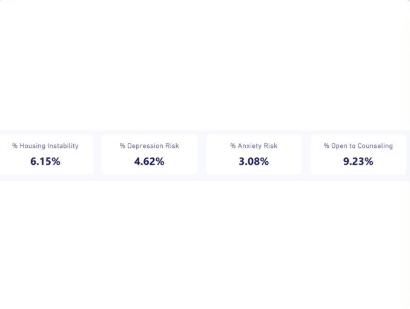
FAMCare outcomes measures: housing instability, depression risk, anxiety risk and open to counseling (test data)
Progress measured the same way each time.

5 · Report

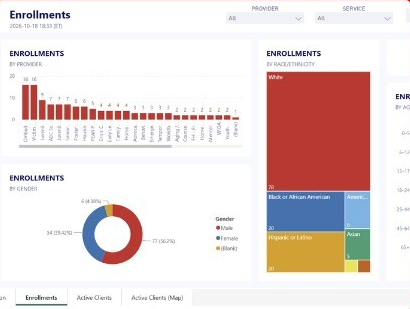
FAMCare enrollments report dashboard by provider, race and gender (test data)
Counted, filtered and exported.
Every step saves to the same client record. That’s why the report at the end can count it, without anyone rebuilding it by hand.
Real FAMCare screens with test data.
Why reporting breaks

The data is there. The structure isn't.

Most agencies don’t lack data. They lack data that was collected the same way every time. When intake is a free-text note, each staff member writes it in their own style. When programs keep their own records, the same client is counted twice. And when the report is due, someone hand-counts files to rebuild a story the agency already lived.

Free text you can't count

Notes that read well but can’t be totaled, filtered or compared.

Hand counts at deadline

Pulling files and spreadsheets together to reach one final number.

Gaps found too late

Discovering a required field was never collected when the funder asks for it.
“Even with our current data software, we have to hand count, pull files, pull different data together.”
Kimberly Kirchner, Naomi Child Welfare Coordinator, Kenaitze Indian Tribe, describing reporting before FAMCare
Why FAMCare is different

Structure decides what you can report.

Reporting software can only sort and count what was captured. FAMCare starts earlier, at the form, so every report has something solid to stand on.
Form→Field→Client record→Report
1

Every answer is a field, not a sentence.

Dropdowns, dates and checkboxes store one consistent value behind a readable label. “Completed program” means the same thing in every program, every year.
2

Every form connects to one client.

Intake, enrollment, services, assessments and case notes all attach to the same client record, so a report can bring them together without retyping or matching names.
3

The workflow asks at the right moment.

Forms prompt staff for what comes next, so missing items show up during intake, not at the reporting deadline.
4

When the funder changes, the form changes.

With VisionsPRO, your administrators add a field, a dropdown option or a new form for a new grant requirement, and it’s reportable from the next entry.
Collect it right once, and a report becomes a question you ask, not a project you start.
Funder-ready, honestly

Funder-ready reports are built, not bought.

No case management system arrives with your funders’ reports already built. Every funder defines its own categories, measures and reporting periods, and they change. FAMCare’s job is to make sure your data can answer them, then give you the tools to build each report or extract once and rerun it every period.

Your team learns this during GVT’s guided onboarding. On FAMCare Growth, our Professional Services team can build funder reports and extracts with you.

1

Map the requirement

List what each funder asks for: the data elements, categories and timeframe.
2

Shape the forms

Add or adjust fields in VisionsPRO so each element is collected as structured data, at the right point in the workflow.
3

Build it once, rerun it every period

Save the report in the Report Wizard, slice it with a pivot table, view it in Power BI, or export it to CSV for a funder portal.
Not sure your current data can answer your funders?
The reporting tools

Tools that work because the structure is already there.

Reports & Outcomes library

A library of predefined reports comes with your system, organized by category, each with a short description. Every report your team builds joins it.

Report Wizard

Build a report without programming. Pick fields straight from the form as staff see it, combine forms around the client record, rename and sort columns, and add filters people choose when they run it, such as a date range or a program.

Pivot tables

Turn a report into counts and summaries by worker, program, service or any other field.

Power BI dashboards

A live view of referrals, enrollments and active clients for leadership, filtered by date range or source.

Export

Send report results to CSV for funder portals, state systems or your own analysis.
Every report is protected by role-based security. Administrators choose which groups can see each report, and staff can keep a draft private until it’s ready.
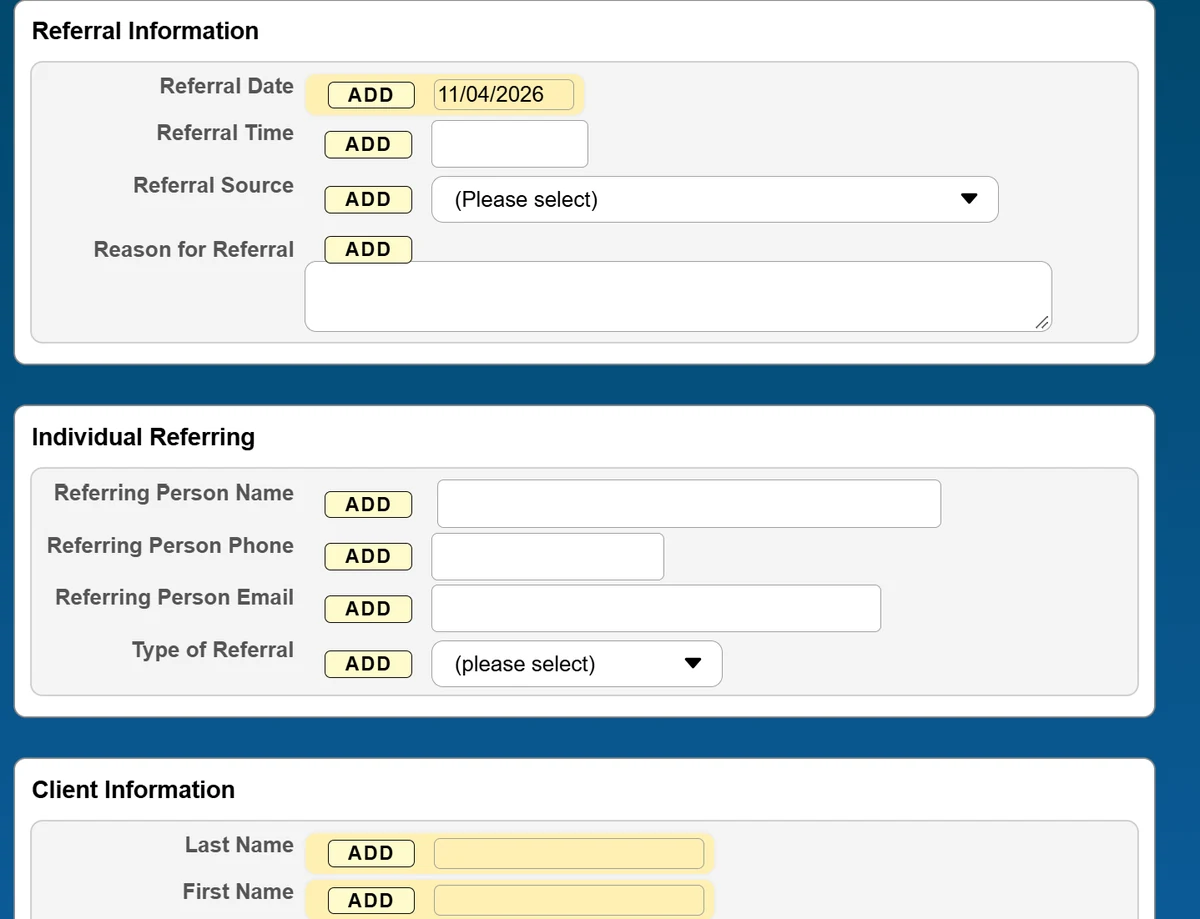
FAMCare Report Wizard Visual Assist: a form as staff see it, with an ADD button beside each field.
The form as staff see it, with an “add” button beside each field. Real FAMCare screens with test data.

Start with the question.

How many clients did we serve this quarter, and in which programs?
What were their demographics over the last three fiscal years?
How many people started, and how many finished?
Which assessments are overdue, and for which caseworkers?
What outcomes are we achieving, by program?
What does this funder need for this period’s report?

What agencies say about reporting with FAMCare

Writing an RFP, Barrier Free Living needed three fiscal years of demographics and trends. Their team pulled them easily from FAMCare.
“We do have a lot of different funders with a lot of different needs, and they all want something different.”
Cynthia Amadeo, CEO, Barrier Free Living
When a grant adds a requirement, Kenaitze changes the form themselves.
“If we need something simple, add an option to a dropdown, or even add a dropdown because of a grant requirement, we can do that very easily.”
Kimberly Kirchner, Naomi Child Welfare Coordinator, Kenaitze Indian Tribe
Autism Delaware reports to its board and to funders on the family support it provides.
“The reports available in FAMCare do help us clearly tell the story.”
Daphne Carnright, Director of Family Services, Autism Delaware

Reports as secure as the records behind them.

Role-based access decides who sees each report, just as it decides who sees each form. FAMCare is SOC 2 and TX-RAMP Level 2 certified, on secure Microsoft Azure hosting.
SOC 2 certifiedTX-RAMP Level 2 certified

Questions about FAMCare reporting

No system can, because each funder defines its own measures and changes them. FAMCare includes a library of predefined reports and structures your forms so each funder’s elements are collected consistently. You then build each funder report once, save it and rerun it every period, on your own or with our Professional Services team.

Yes, for everyday reports. The Report Wizard lets staff pick fields straight from the forms they already use and add filters such as date ranges. Administrators can use advanced settings for more complex criteria.

In most cases, yes, because the data is stored as structured fields. Reports can be built to match a required layout and exported to CSV. Our team can confirm the fit for a specific extract during the Data Health Check.

Your administrator adds the field or dropdown option in VisionsPRO, and it’s reportable from the next entry. Records created before the change won’t have it, which is why we recommend mapping requirements at the start of each grant.

Yes. FAMCare’s Data Visualization Dashboard is built on Microsoft Power BI and is included in FAMCare Growth.

Administrators assign each report to security groups. Staff only see the reports their role allows.

In their first 14 days of training, staff learn to build reports using data from different FAMCare forms. GVT’s guided onboarding helps them see how the information they enter every day shapes the reports their agency relies on, and why it matters to enter it accurately, completely, and on time.

Can your current data answer your next funder report?

Find out where your forms and fields are helping your reporting, and where they’re working against it.